Subscription & API Key
Both integration flows fetch rates from the Global Exchange Rates API and require an active subscription.
Get an API key
- Register on the Global Exchange Rates developer portal. A 30-day free trial is available.
- Subscribe to a plan that fits your usage.
- Copy your subscription key from the portal; this is the value for the
GER_API_KEYsetting in the integration flow configuration.
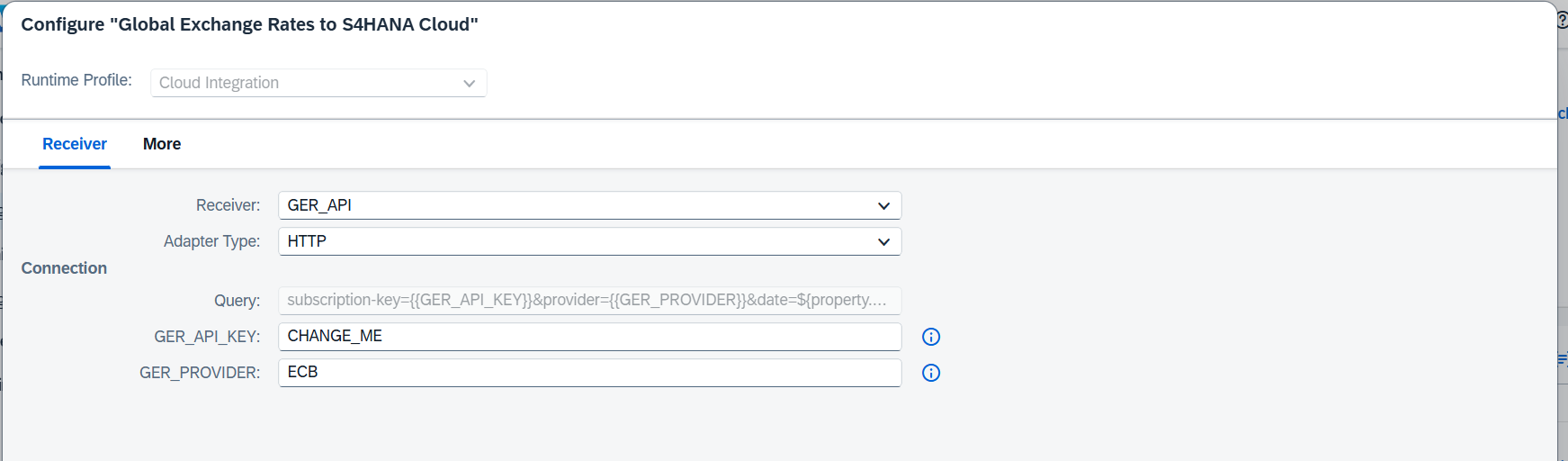
Choosing a provider
The GER_PROVIDER setting selects which official source the flow fetches, for example ECB for the European Central Bank.
To find the code for your central bank or tax authority, open the following address in a browser, replacing YOUR_KEY with your subscription key:
https://api.globalexchangerates.org/v1/providers?subscription-key=YOUR_KEY
The response lists every available provider with its code (the value to configure), name, country, and base currency. The coverage page gives an overview of the available sources.
- Rates are delivered in the provider's own base currency, exactly as published.
- One subscription covers all providers. To feed different companies or rate types from different sources, deploy one configured copy of the integration flow per provider, each with its own
GER_PROVIDERvalue. - The blended
GLOBALprovider fills currencies that an individual source does not publish.
Key handling
The API key is stored as a configuration value of the integration flow and is sent to the Global Exchange Rates API only. Treat it like any credential: don't share configured artifacts outside your organization, and rotate the key from the developer portal if needed.