Configuration: ECC & S/4HANA On-Premise
The Global Exchange Rates to SAP ECC - S4HANA On-Premise integration flow posts rates as standard EXCHANGE_RATE01 IDocs through SAP Cloud Connector. The rates are booked by SAP's standard inbound processing; nothing is installed in your SAP system.
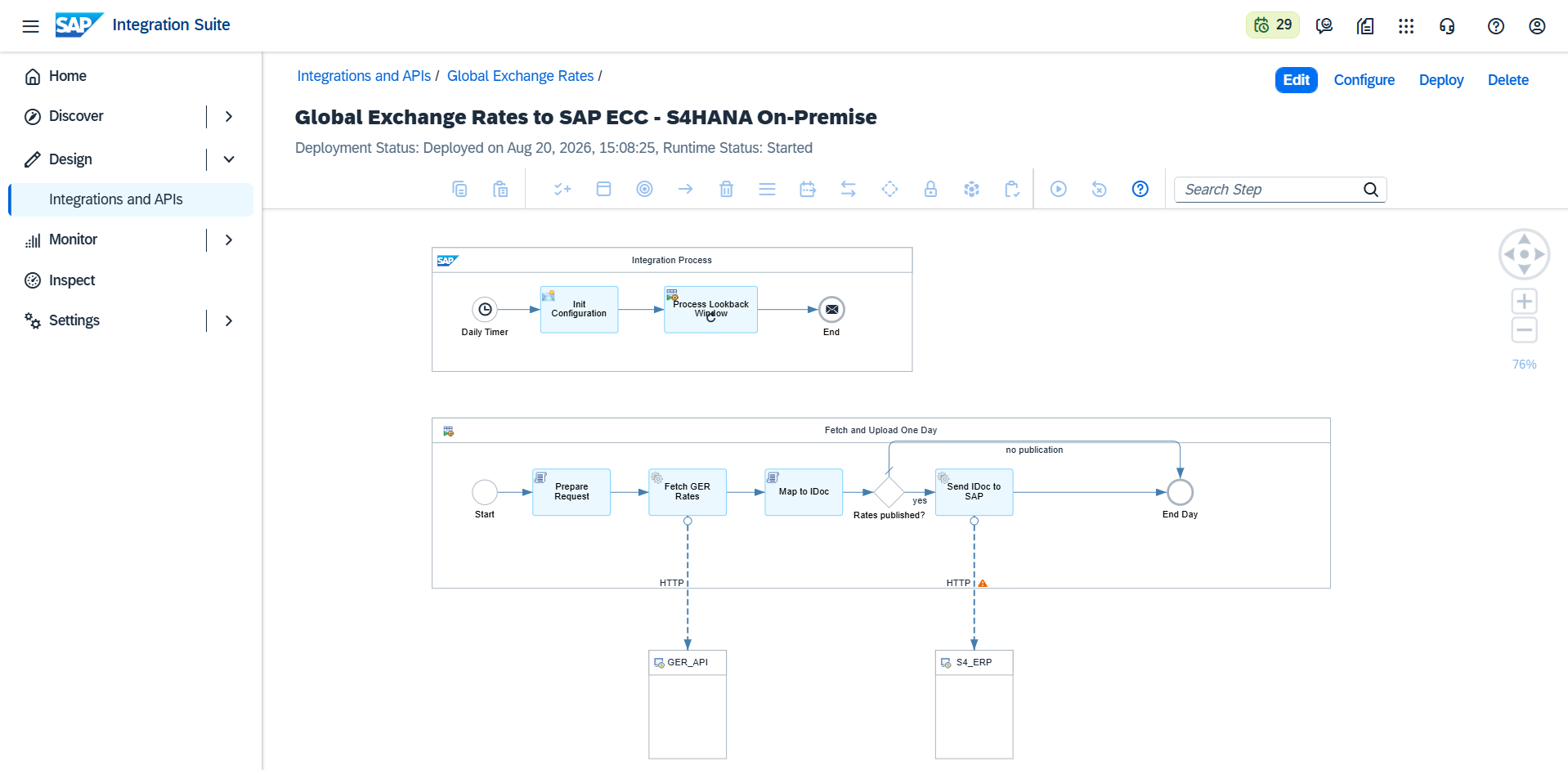
SAP-side prerequisites
One-time configuration, done by your SAP basis team (standard settings, no code):
- SAP Cloud Connector installed and connected to the BTP subaccount that runs Integration Suite, exposing the SAP system's HTTP(S) IDoc inbound service (check in
SICFthat the IDoc inbound service is active). - A logical system for the sender (transaction
BD54), e.g.GERCPI. - A partner profile (transaction
WE20): partner type LS, partner = the sender logical system, with an inbound parameter for message typeEXCHANGE_RATE, process codeBAPI. - An SAP service user authorized for inbound IDoc posting.
Configure the integration flow
Open the flow in the package and choose Configure.
Receiver tab, GER_API:
| Setting | Value |
|---|---|
GER_API_KEY |
Your Global Exchange Rates subscription key |
GER_PROVIDER |
The official source to fetch, e.g. ECB |
Receiver tab, S4_ERP:
| Setting | Value |
|---|---|
S4_IDOC_URL |
The IDoc inbound endpoint through Cloud Connector, using the virtual host, e.g. http://<virtual-host>:<port>/sap/bc/srt/idoc |
More tab:
| Setting | Default | Meaning |
|---|---|---|
GER_DATE_OFFSET_DAYS |
0 |
0 fetches the run date, 1 the previous day |
GER_LOOKBACK_DAYS |
0 |
See Scheduling & Backfill |
SAP_RATE_TYPE |
M |
Exchange rate type to post, as in OB08 |
IDOC_SENDER_LS |
GERCPI |
Must match the partner profile created in WE20 |
IDOC_RECEIVER_LS |
(required) | The logical system name of the receiving SAP system |
S4_CREDENTIAL_ALIAS |
S4_BASIC |
Name of the credential created below |
Set up credentials and connectivity
- In Security Material, create a User Credentials artifact named as in
S4_CREDENTIAL_ALIAS(defaultS4_BASIC) with the SAP service user and password. - Open the flow in Edit mode, select the HTTP channel to S4_ERP, and set Proxy Type to On-Premise (add the Cloud Connector Location ID if your landscape uses one).
- Save and Deploy.
Verify
- The flow runs immediately on deployment; check Monitor → Message Processing for a Completed run with the generated IDoc attached.
- In the SAP system, transaction
WE02/WE05shows the inbound IDoc with status 53 (posted). - The rates are visible in
OB08for the configured rate type and date.
Then set the daily schedule; see Scheduling & Backfill.