Monitoring & Alerting
The integration is fully observable through SAP Integration Suite's standard monitoring; no additional tooling required.
Checking runs
Open Monitor → Message Processing (filter by the flow name if needed). Each run appears as a message:
- Completed: the run succeeded. Either rates were delivered, or the source had no publication for the requested date (visible in the run's log properties as a "no rates published" note).
- Failed: something needs attention; the error text identifies the failing step. See Troubleshooting.
What each run records
Every successful delivery attaches the full evidence to the message:
- GER Response: the rates exactly as fetched from the Global Exchange Rates API.
- The delivered payload: the MRM upload (S/4HANA Cloud flow) or the generated IDoc (ECC / on-premise flow).
- Log properties with the rate count, base currency, and rate date.
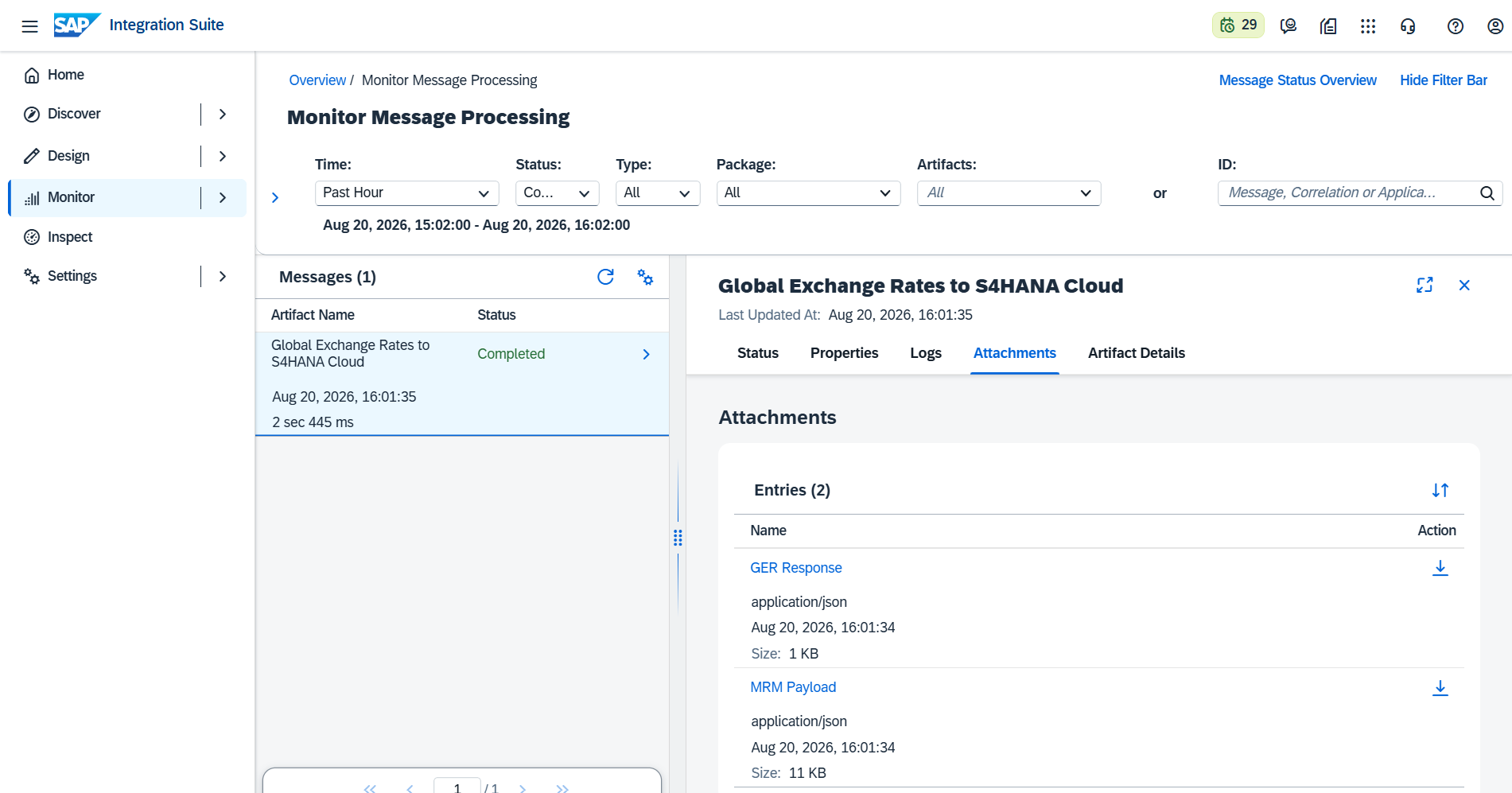
This makes reconciliation straightforward: what was fetched and what was delivered are both attached to the same message, permanently within your tenant's retention period.
Alerting on failures
Use your tenant's standard alerting rather than per-flow mechanisms: SAP Integration Suite integrates with SAP Alert Notification service (and SAP Cloud ALM) to notify on failed messages across all your integration flows, including this one. If your organization already monitors Integration Suite, this flow is covered automatically; no additional setup is needed.